Collection Runner
Run every request in a collection (or folder) as a single plan.
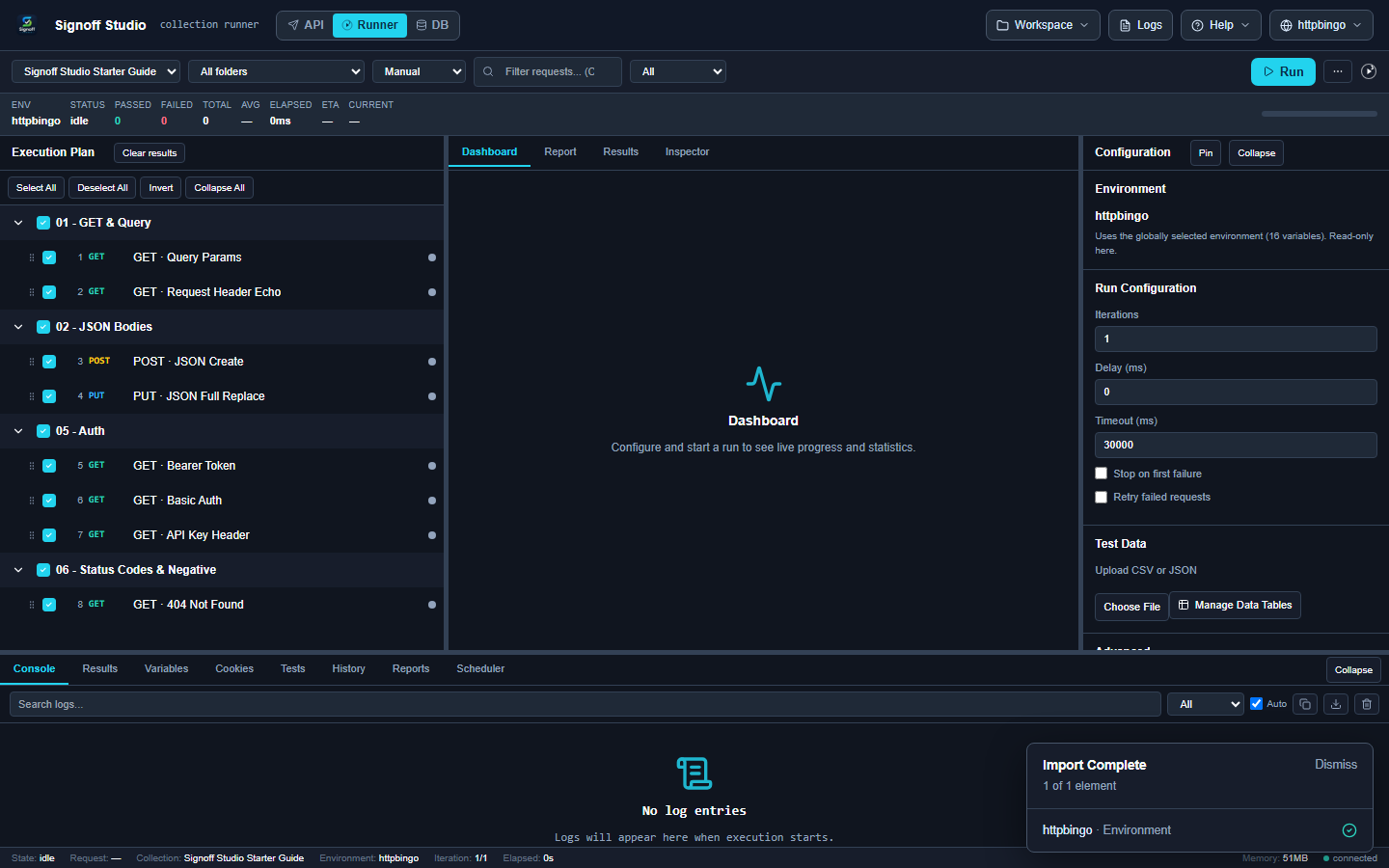
Run the Starter Guide
- Import the Starter Guide and select httpbingo.
- Switch to Runner.
- Choose collection Signoff Studio Starter Guide.
- Keep All folders (8 requests) selected — or narrow to one folder.
- Click Run.
What you see
| Area | Purpose |
|---|---|
| Execution plan | Checkbox list of requests |
| Stats bar | Passed / failed / total / timing |
| Dashboard / Report / Results | Live progress and outcomes |
| Configuration | Iterations, delay, timeout, stop-on-fail |
| Test data | Optional CSV/JSON for data-driven runs |
Tips
- Select httpbingo before running so
resolves.{{baseUrl}} - Start with folder 01 - GET & Query if you want a shorter first run.
- Use API mode to fix a failing request, then re-run.
Keyboard
| Shortcut | Action |
|---|---|
| Ctrl+Enter | Run |
| Ctrl+F | Filter requests |
| ? | Shortcuts help |
Full list: Keyboard shortcuts
Next
Need something else? See the FAQ. Questions: [email protected]. Bugs: [email protected].